Bloomz
- 3.8
- Rating
- 1.00M
- Installs
- Free
- Price

 Analysis by App-foxy
Keeping up with a child’s school life often means chasing messages across too many places. Bloomz approaches that problem as a parent communication app from Bloomz, designed to bring school-related conversations into one mobile experience. I found its value less in any single flashy tool and more in the way it can turn scattered updates into a routine: check the app, see what matters, respond when needed, and return to family life.
That promise also depends heavily on connectivity. Bloomz is most useful when messages, announcements, and other communication arrive while I have a reliable internet connection. When the network is slow or unavailable, the experience becomes less predictable because the app’s main purpose is keeping people connected. That makes it a practical choice for families who already live comfortably with school communication through a phone, but a less convincing option for anyone expecting a self-contained offline organizer.
How Bloomz fits into everyday parent communication
The app sits in the education category, but I would not describe it as a learning platform in the same way as a lesson app or a homework practice tool. Its center of gravity is communication between families and the people involved in a child’s school experience. That distinction matters. You install it to stay informed, not primarily to study inside it.
You May Also Like

 Blood Strike: 2.5 Anniversary
Blood Strike’s Loadouts Turn Every Drop Into a Tactical Gamble
A close look at Blood Strike’s custom loadouts: how fast access to signature weapons reshapes its battle royale rhythm, rewards preparation, and narrows the gap between fights.

 Pandora - Music & Podcasts
Pandora’s Music Is Easy to Start, but Harder to Recover
Pandora’s strength is its low-effort path from a seed to a station. Its weak spot is how much confidence it asks you to place in connection, setup, and quiet recovery.

 8 Ball Pool
 Is Built on Rivalries, Rematches, and Routine
A close look at the rivalries, rematches, shared routines, and unanswered safety questions that turn a quick pool match into a persistent mobile community.

 Samsung Music
’s Quiet Strength Is Playing What You Already Own
Its reach comes less from spectacle than from dependable access to a personal library. That simplicity is both the app’s strongest retention engine and its ceiling.

 AccuWeather: Weather Radar
AccuWeather Review: A Quick, Clear Forecast for Everyday Decisions
For everyday plans, the best forecast is the one you can understand quickly. AccuWeather makes rain timing, radar, and local conditions easy to act on, with a few trade-offs.

 Hill Climb Racing
Why Hill Climb Racing Still Turns Crashes Into One More Run
A tiny car, a bumpy hill and one more upgrade: Hill Climb Racing keeps resurfacing because its simple chaos makes every near-miss feel personal.
More From Our News Desk



In daily use, the best way to think about Bloomz is as a shared communication space. Instead of relying only on paper notices, individual messages, or a general social network, parents can use a school-focused channel for updates and replies. The “one app” idea is helpful when a school community actually adopts it consistently. If only some information appears there while other details remain in email, printed notes, or another service, the convenience naturally drops.
I also appreciate that the app is free to install. That removes an obvious barrier for families who simply need access to school communication. There are in-app purchases ranging from under a dollar to well over a hundred dollars per item, so I would still check which parts of the experience a school or account setup expects before treating the free label as the whole cost picture.
Bloomz has been available since October 2014, and its long presence helps explain why it feels like a communication product rather than a newly assembled messaging experiment. The current version is 6.2.8. On Android, it supports devices running version 7.0 or later, which covers many older phones but still makes the operating-system requirement worth checking before installation.
Where the network changes the experience
Connectivity is not a minor background detail here. If I open Bloomz while connected to a dependable Wi-Fi network or mobile data, the app can serve its main purpose: showing me current communication and allowing me to participate. A weak signal changes the rhythm. I may open the app at the exact moment I need an update, only to wait for content to appear or discover that I need to try again later.
That matters most for time-sensitive school life. Imagine a parent leaving work and checking the phone before picking up a child. A message about a changed arrangement is useful only if it reaches the parent in time and can be read clearly. Bloomz can make that communication more centralized, but it cannot remove the uncertainty created by a poor connection, a phone with restricted data, or a school community that posts inconsistently.
My practical advice is to treat important information as something to verify before leaving a reliable connection. If I know I will be traveling through an area with patchy service, I would check recent communication in advance and make a mental note of anything that affects the day. That is not a criticism unique to Bloomz; it is simply the trade-off of using a connected communication tool for real-world schedules.
Using it on the move without turning it into another distraction
Bloomz makes the most sense on a phone because parents often need school information between other tasks. I can imagine checking it during a commute stop, while waiting outside an activity, or during a short break at work. The mobile setting is convenient, but it also encourages quick, fragmented checking. That can be useful for short updates and less comfortable when a conversation becomes complicated.
I would use a simple routine: check messages at a few predictable points in the day, respond to anything that genuinely needs an answer, and avoid treating every notification as an emergency. The app is meant to improve communication, not make parents permanently available. A school-focused channel can still become noisy if every small exchange demands immediate attention.
For families with more than one child, organization becomes especially important. I would first learn how the school has arranged its communication spaces and then separate urgent information from general discussion in my own habits. Reading everything in arrival order is not always the best approach. I found it more sensible to look for the child, class, or activity connected to the message before deciding whether it requires action.
Another mobile consideration is typing. A quick acknowledgement is easy enough on a phone, but writing a careful explanation on a small screen can be tiring. When a discussion involves attendance, a sensitive concern, or several details, I would draft the response slowly rather than firing off a rushed message. Bloomz is convenient for access, but convenience should not dictate the quality of communication.
What happens when a message fails to arrive smoothly
Any connected app needs a recovery habit, and Bloomz is no exception. If a message or update does not appear, I would not immediately assume that the school has failed to send it. First I would check the connection, close and reopen the app, and try again from a more stable network. If the information is important, I would use the school’s established backup contact method rather than waiting indefinitely.
This is one of the most important limits to understand before relying on Bloomz. Centralizing communication can reduce confusion, but it also creates a single place that parents may begin to trust too much. A missed update can have practical consequences if nobody notices the failure. For urgent arrangements, I prefer a small amount of redundancy: check the app, keep track of the normal school contact route, and confirm anything that would affect pickup or safety.
Recovery is also about avoiding duplicate replies. When a connection is unstable, repeatedly tapping send can create uncertainty about whether a message went through. I would wait, check the conversation again, and look for evidence that the message is present before trying a second time. That small pause prevents a simple network problem from becoming a string of repeated messages.
The same principle applies to announcements. If the app appears to show old information, I would refresh only after checking whether the phone is actually online. Repeatedly reopening a screen without improving the connection rarely solves the underlying issue. A calm, step-by-step approach is more reliable than assuming every delay is an app error.
Keeping mobile data use sensible
Parents do not all have unlimited mobile data, and school communication can arrive at inconvenient times. I would use Wi-Fi for routine browsing whenever possible, particularly at home, while reserving mobile data for checking genuinely useful updates. This is less about avoiding Bloomz and more about fitting it into a realistic phone plan.
A data-conscious routine also reduces battery anxiety. Constantly opening any communication app throughout the day is inefficient, especially when the phone is already handling navigation, calls, and other family tasks. Checking at sensible intervals gives me control over the app instead of letting every possible update dictate my attention.
There is a trade-off here. Checking less often may save data and attention, but it can delay awareness of a new message. Checking constantly may feel reassuring, but it can turn school communication into a source of stress. I would choose a schedule based on the family’s actual needs: more frequent checks on days with changing arrangements, fewer on ordinary days with predictable routines.
I would also be cautious when using public Wi-Fi. A parent may be tempted to connect in a café or waiting room just to catch up quickly, but important conversations deserve a setting where I can read carefully and avoid sending something to the wrong place. Convenience should not replace attention, particularly when several school groups or family members are involved.
Useful workflows beyond simply reading updates
One non-obvious strength of a dedicated communication space is that it can help establish a repeatable workflow. I would use Bloomz as a daily inbox rather than a permanent archive in my head. After checking it, I would turn any practical detail into an action outside the app: add a reminder for an event, prepare an item for the next morning, or tell another caregiver what they need to know.
That approach prevents a common mistake: reading an announcement and assuming that remembering it is enough. A school message may be clear, but parents are often multitasking. Bloomz can deliver the information, while the parent still needs a personal system for acting on it. The app works best as the communication layer, not as a replacement for every calendar, reminder, or family conversation.
A second useful habit is to keep replies focused. In a busy school communication environment, a short answer that identifies the child, the relevant day, and the requested action is easier to follow than a long message mixing several topics. If I need to raise a separate concern, I would start a distinct conversation where appropriate rather than burying it inside an unrelated response.
A third trade-off involves centralization itself. Having school communication in one place is convenient, but it can make the app feel important enough to check compulsively. I would decide which messages require immediate action and which can wait. That boundary is especially valuable for parents who already receive work notifications, family messages, and reminders on the same phone.
Who will appreciate Bloomz most?
I think Bloomz is a strong fit for parents whose schools or classes actively use it as a shared communication hub. In that situation, the app can reduce the need to remember several separate channels and make school-related contact feel more structured. It is also suitable for caregivers who want mobile access rather than depending on a desktop browser or a paper notice.
It may be particularly helpful in families where more than one adult needs awareness of school information. A centralized communication routine can make it easier to coordinate responsibilities, provided everyone follows the same channel and checks it consistently. The benefit is not that the app magically solves family scheduling; it is that fewer people are working from different versions of the same update.
The Everyone content rating makes the app broadly approachable from an age-classification perspective, though the person using it will normally be an adult or caregiver managing school communication. Its audience is therefore less about a child’s reading level and more about whether the family wants a school-centered way to stay informed.
Bloomz is less compelling for someone who wants interactive lessons, flashcards, tutoring, or a full academic workspace. It is also not the right answer for a school community that has already standardized on another communication system and rarely posts here. In that case, installing it may create another inbox rather than simplifying anything.
How it compares with familiar alternatives
Email remains the obvious alternative. It is flexible, searchable, and familiar, but school communication can become buried among work and personal messages. Bloomz feels more focused because its purpose is tied to school and family communication. The trade-off is that parents must adopt another dedicated app, and its usefulness depends on the school community using it reliably.
Paper notices have the advantage of being visible on the kitchen counter, but they are easy to lose and difficult to share with another caregiver. Bloomz is better for timely access and ongoing conversation, especially when a parent is away from home. Paper can still be preferable for families who do not want every school detail tied to a phone or internet connection.
General messaging apps are fast and familiar, yet they may mix school communication with unrelated personal chats. Bloomz offers a more purpose-built setting, which can make school information easier to recognize. On the other hand, a general messaging service may be the better choice for a small group that wants nothing more than quick informal coordination and already has a trusted routine.
A school website or parent portal may remain better for static reference information, depending on how a school organizes its materials. Bloomz is more naturally suited to communication that changes and invites a response. I would not expect one tool to replace every school resource; the best experience comes when parents understand what belongs in Bloomz and what belongs elsewhere.
Ratings, reach, and the practical cost question
Bloomz has an average rating of 3.8 from around eighteen thousand ratings, alongside roughly five thousand eight hundred written reviews. That suggests a substantial range of experiences rather than universal approval. I read that as a reason to judge the app by the communication habits of the specific school, not by the score alone.
It has passed the one-million-install mark, which indicates that the idea has reached a meaningful number of families. Reach is reassuring, but it does not guarantee that a particular classroom will use the app well. A communication platform succeeds locally: the right people need to post in the right place, and parents need to know where to look.
The free entry point is welcome, especially when a school asks families to join. Still, the presence of optional purchases means I would pay attention during setup and avoid assuming that every available function is included without cost. I would also discuss expectations with the school before paying for anything, because a family should know whether an extra purchase is genuinely necessary for its communication needs.
My connectivity verdict
After using Bloomz as a parent communication tool, I see it as most valuable when it replaces scattered school updates with a dependable shared routine. Its strengths appear during connected moments: checking an announcement before leaving home, responding during a break, or coordinating with another caregiver while plans are changing.
Its weakness is inseparable from that strength. Because the experience revolves around communication, a poor connection, delayed checking, or inconsistent community use can reduce its usefulness at exactly the wrong time. I would not rely on it as the only safeguard for urgent arrangements, and I would not choose it for offline planning or academic study.
For families whose schools actively use Bloomz, I think the free app is worth trying. Set a sensible checking routine, use Wi-Fi when convenient, keep a backup contact method for urgent matters, and turn important updates into calendar or family actions rather than trusting memory. With those habits, the app can make school communication calmer and easier to follow.
My final recommendation is therefore conditional but positive: Bloomz is a practical connected communication hub, not a complete education system or an offline safety net. If your school community genuinely gathers there, it can earn a regular place on your phone. If communication is already fragmented or your family prefers fewer app-based responsibilities, email, a parent portal, or a simpler established method may serve you better.
FAQs for Bloomz
01What is Bloomz, and who is it designed for?
Bloomz is a school and family communication app designed to connect teachers, parents, students, and school administrators in one place. After exploring its main features, it is best suited to classrooms, schools, childcare centers, and families that need updates about announcements, homework, events, messages, and student activities without relying on several separate communication tools.
02What can parents and teachers do with Bloomz?
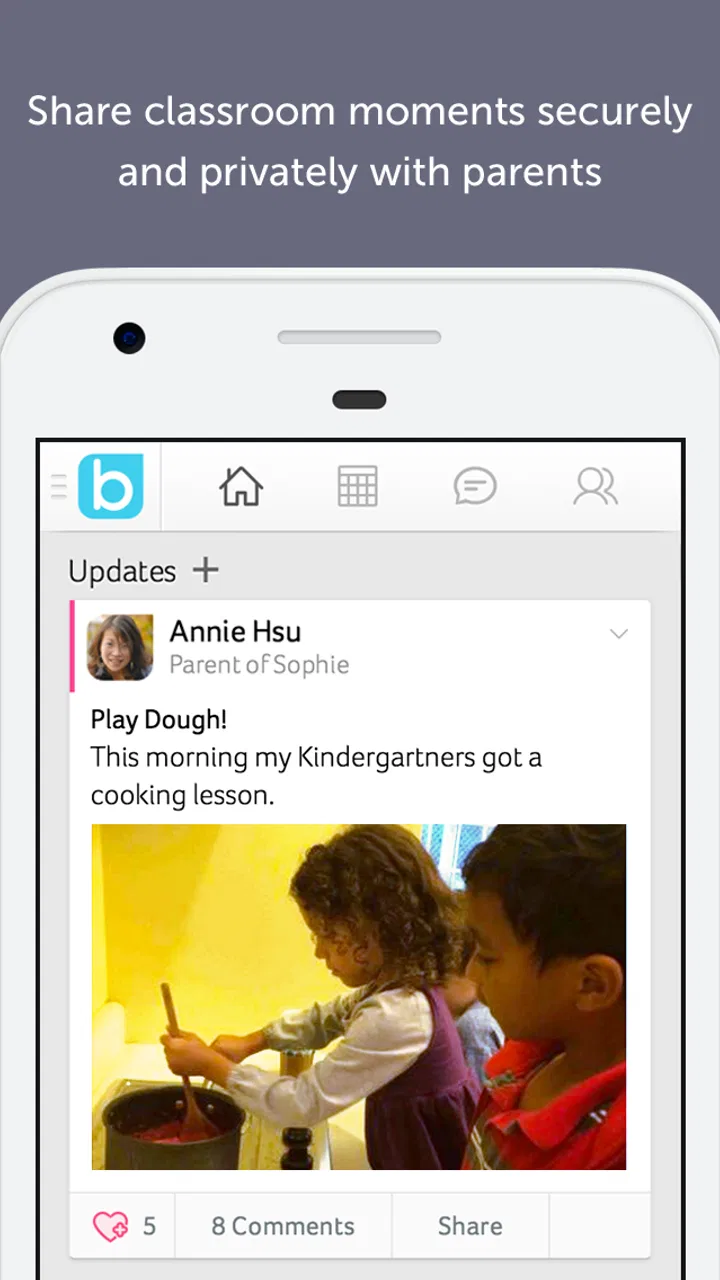
Bloomz offers tools for sharing classroom announcements, sending private or group messages, posting photos and updates, managing calendars, organizing events, and coordinating volunteer activities. Depending on the school’s setup, teachers may also share assignments, reminders, attendance-related information, or progress updates. The exact features available can vary according to the institution’s subscription and administrator settings.
03Is Bloomz free to download and use?
The Bloomz app can generally be downloaded at no cost, but access to its features may depend on how a school, teacher, or organization uses the platform. Some services are provided through an institution’s plan, while other options may vary by account type or region. Before downloading, users should check whether their school has already invited them and whether any additional paid features apply.
04Is Bloomz safe for sharing children’s information and photos?
Bloomz includes privacy-focused communication options intended for school communities, such as controlled groups, classroom-specific posts, and private messaging. However, parents should still review the school’s policies and the app’s current privacy terms before sharing photos or personal details. Avoid posting sensitive information unnecessarily, and confirm who can view content, since visibility depends on account permissions configured by the school or teacher.
05What should I do if I cannot join my child’s classroom or receive notifications?
If you cannot access the correct classroom, first confirm that you registered with the email address or phone number provided to the school. Check invitation links, spam folders, notification permissions, and the app’s account settings. Updating Bloomz to the latest version or signing out and back in may also help. If the problem continues, contact the teacher or school administrator, because they may need to resend the invitation or correct your account details.
Pros
- Combines messaging
- announcements
- calendars
- and updates in one app.
- Supports private communication between teachers
- families
- and school groups.
- Offers translation tools that can help multilingual families stay informed.
- Allows photo and video sharing for classroom and school activities.
- Provides reminders and event details to help families organize schedules.
Cons
- Some features may require a paid school or premium subscription.
- Frequent notifications can become overwhelming without careful settings.
- The interface may feel complex for users managing several groups.
- Performance can vary depending on the school’s configuration and usage.
- Access to features depends heavily on whether the school actively uses Bloomz.

Bloomz
Gallery